Using your phone as a personal hotspot is a simple way to stay connected wherever you are. Whether you’re sharing your mobile data with a laptop at a café, connecting a tablet on the go, or keeping friends online, a hotspot turns your phone into a portable Wi-Fi source for all your devices.
This feature becomes especially valuable when you’re abroad, letting you avoid unreliable public Wi-Fi and keep all your devices connected with just one data plan.
But how much data does a hotspot actually use? The answer depends on your online activities, the number of connected devices, and whether your provider restricts hotspot usage. Not the hotspot itself.
In this article, we’ll explain how hotspots work, what influences data consumption and share tips to help you manage your data usage with confidence.
What is a hotspot and how does it work?
A personal hotspot is a feature on your smartphone that turns it into a portable Wi-Fi router. It takes your phone’s cellular data connection (like 4G or 5G) and broadcasts it as a Wi-Fi signal. This allows other devices, such as your laptop, tablet, or a friend’s phone, to get online using your data plan.
It’s perfect for travelers who want to share one data plan across multiple devices. Your mobile internet connection is also secure and more reliable than public Wi-Fi.
Difference between mobile hotspot, tethering, and Wi-Fi sharing
Mobile hotspot, tethering and Wi-Fi sharing are often used interchangeably, but there are subtle distinctions:
- Mobile Hotspot specifically refers to creating a wireless Wi-Fi network from your phone that other devices can connect to.
- Tethering is the broader concept of sharing your phone’s internet connection. It can be done wirelessly via Wi-Fi (a mobile hotspot), but also through a USB cable or Bluetooth. Here’s a closer look at how tethering actually works.
- Wi-Fi Sharing is simply another term for creating a mobile hotspot.
How much data does a hotspot use?
As we mentioned at the beginning, a hotspot itself does not use more data. Your data usage will depend entirely on the number of devices connected to the same plan and their activity online.
Therefore, to manage your data consumption effectively, it is important to understand how different applications and online activities use data.
What influences hotspot data consumption
Several factors can cause you to burn through your data allowance faster than expected.
- The number of connected devices: Every device connected to your hotspot shares the same data pool. Two devices don’t just use double the data; they can use much more if they are all running background updates and different apps.
- The type of activity: The biggest factor is your activity. Streaming video is the most data-hungry task, capable of using gigabytes of data in a single hour. Simple browsing is far less demanding.
- The quality of the network: A faster network like 5G can paradoxically lead to higher data usage. Streaming services often auto-adjust to the best possible video quality, meaning a faster connection will default to data-heavy HD or 4K streams.
- Automatic background updates: This is a silent data killer. Laptops and tablets are constantly downloading app updates, syncing photos to the cloud, and refreshing software in the background.
Average data usage by activity
Data consumption can vary, but here is a clear breakdown of how much data different online activities typically use per hour.
| Activity | Typical data per session (approx.) | Notes / assumptions |
| Consulting emails (text only) | 0.01–0.1 MB per email; ~1–5 MB per 10‑minute session | Attachments (PDF/images) add 0.1–5+ MB each |
| Web browsing | 1–3 MB per page; ~50–200 MB per hour | Heavy media/ads increase usage |
| Instagram Reels / TikTok | ~8–20 MB per minute; 80–200 MB per 10 min | Assumes compressed mobile video (≈480–720p) |
| Streaming music (Spotify, Apple Music, etc.) | ~11–144 MB per hour | ~11 MB/hr (Low quality of 24 kbit/s) to ~144 MB/hr (High quality of 320 kbit/s) |
| Streaming video 480p | ~0.3–0.8 GB per hour; 0.6–1.6 GB (2‑hour movie) | |
| Streaming video 1080p | ~1–2.5 GB per hour; 2–5 GB (2‑hour movie) | Varies by bitrate (e.g., 3–6 Mbps) |
| Streaming video 4K | ~6.5–11 GB per hour; ~13–22 GB (2‑hour movie) | Many services commonly use ~7–8 GB/hour (≈14–16 GB for 2 hours) |
| Video conferencing (Zoom, Teams, etc.) | ~150–450 MB for 30-minute conference | Depends on resolution, number of participants, screen sharing; can be <100 MB or >1 GB |
| Online Gaming | ~20–200 MB per hour | Data usage can vary depending on the game, its settings and graphics |
Be aware that a laptop will almost always use more data than a phone for the same task. This is because websites often load their full, high-resolution desktop versions on a computer. Laptops also run more background processes, like cloud syncing and automatic software updates, which consume data without you even noticing.
And if you want to understand data usage per app, check out our dedicated guides:
How much data does WhatsApp use?
How much data does iMessage use?
How much data does Instagram use?
How much data does Youtube use?
How much data does Spotify use?
How much data does Google Maps use?
Is hotspot free if you have unlimited data plan?
It depends. First, not all travel eSIM providers support data sharing through hotspots. Additionally, most so-called “unlimited” plans actually have speed caps: after you use a certain amount of data, your mobile internet speed drops significantly to limit further usage. Finally, some providers restrict hotspot usage even on unlimited plans. For instance, Holafly’s plans limit hotspot sharing to 500MB or 1GB per day (source: Holafly website, as of mai 2026). For more information check our article Does using your device as a hotspot cost money?
If you intend to share your connection across multiple devices while traveling, be sure to review the technical specifications before purchasing a travel eSIM.
Choose Orange Travel eSIM with unlimited hotspot sharing
Good news, Orange Travel eSIM allows unlimited hotspot sharing and speed. We provide a range of data plans for every traveler, from 1GB to 500GB. And if you are unsure how much data you will need, you can easily top up at any time.
No daily caps. No sudden stops. Just Internet that never cuts off.
And if you are planning a trip around Europe, check out our eSIM Europe that include data-only or data/calls/SMS plans.
Stay connected wherever you go
With Orange Travel eSIM, enjoy fast and reliable coverage in over 200 destinations. No SIM swap. No stress.
Get your eSIM
How to reduce hotspot data usage abroad?
A few simple tricks can make your data plan last much longer, especially when usinghotspot.
- Turn off automatic updates and cloud sync: Before connecting your laptop, go to the laptop’s settings and disable automatic software updates. On Windows, you can set your hotspot as a “metered connection” to limit background data. Also, pause services like Google Drive, Dropbox, and iCloud Photos.
- Lower your streaming quality: When watching Netflix or YouTube, manually change the video quality from Auto or HD to Standard Definition (SD). This single adjustment can reduce data consumption by over 70%.
- Use data-saving browser modes: Browsers like Google Chrome have a “Lite mode” or “Data Saver” feature that compresses websites before they load, reducing the amount of data used for browsing.
Traveling in Europe? See our guide to the best eSIM for Europe with unrestricted hotspot sharing.
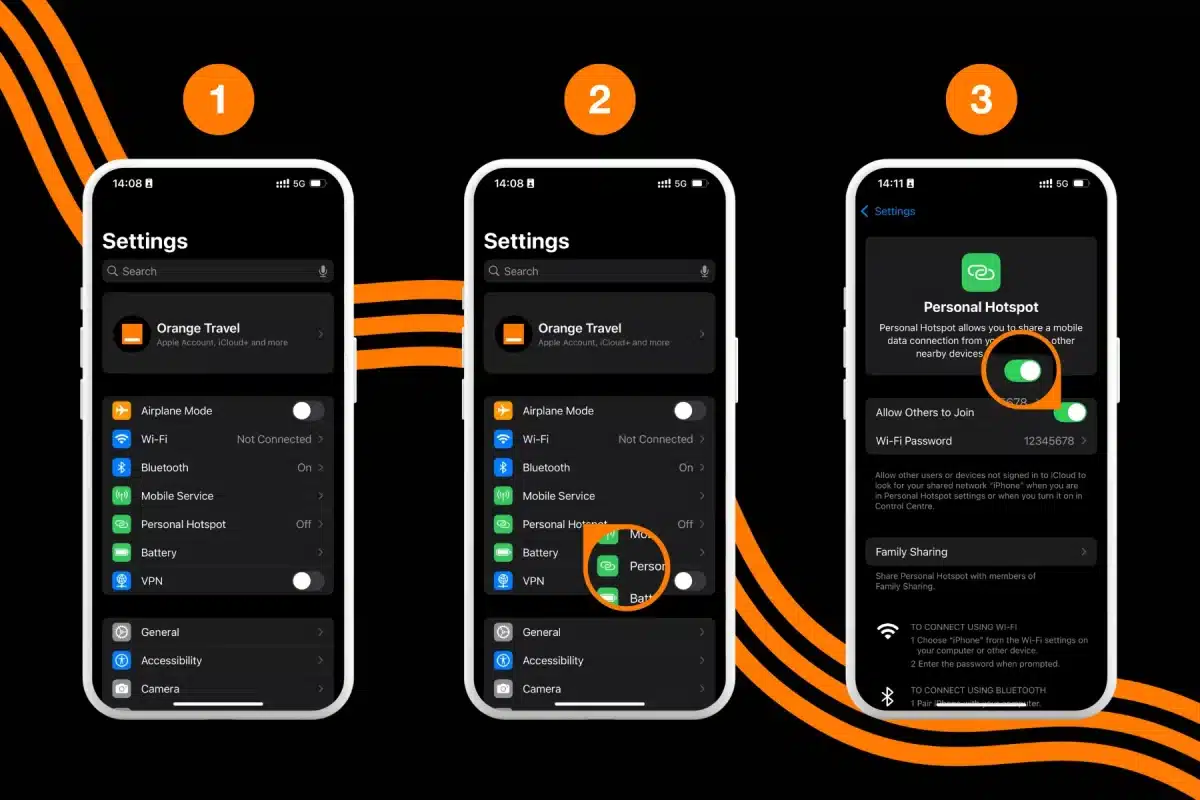
How to turn on hostpot on iPhone?
To turn on personal hotspot on iPhone and start sharing connection with nearby devices:
- Go to Settings
- Select Personal Hotspot
- Enable “Allow Others to Join“
- Set a Wi-Fi Password to prevent unknown devices from joining
Other devices can now be connected by going to Settings > Wi-Fi, look for your iPhone in the list.
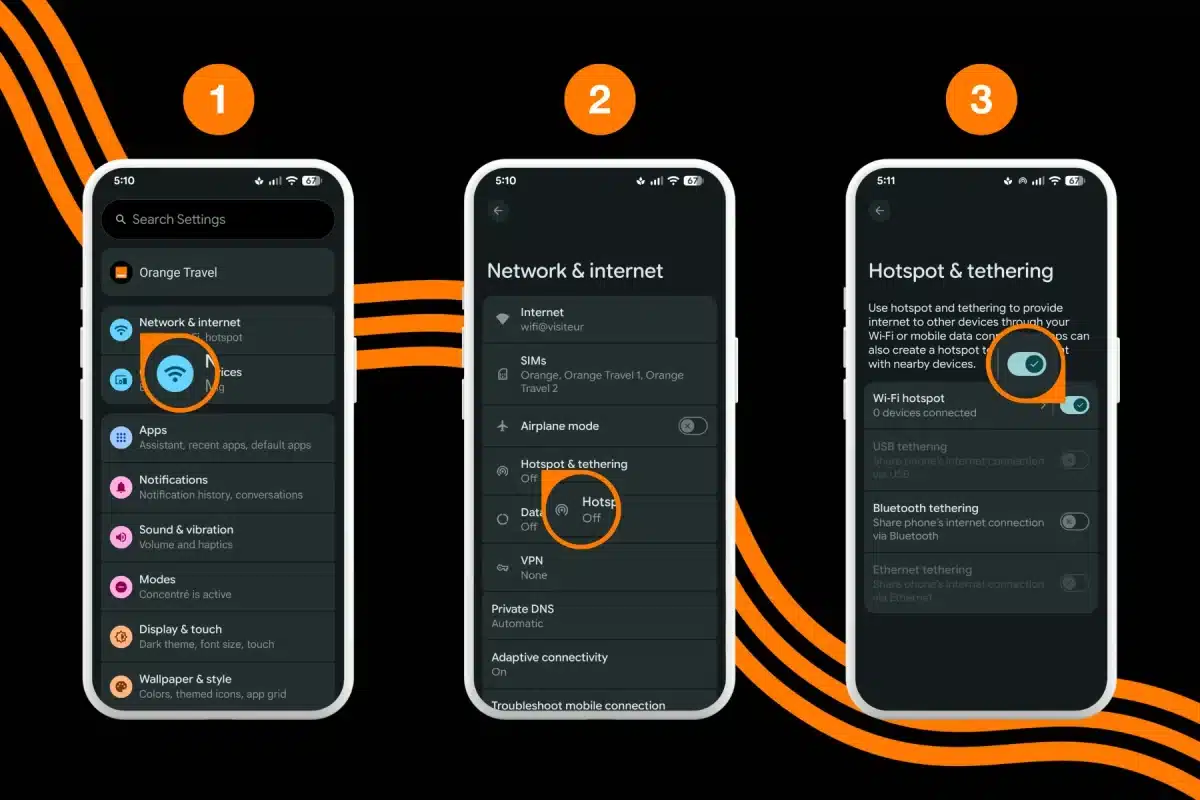
How to turn on hostpot on Android?
To turn on personal hotspot on Andoird and start sharing connection with nearby devices:
- Go to Settings
- Select Networks and Internet
- Select Hotspot and Tethering
- Enable “Wi-Fi Hotspot“
- Set a Password to prevent unknown devices from joining
Other devices can now be connected by going to Settings > Wi-Fi, look for your Android device in the list.
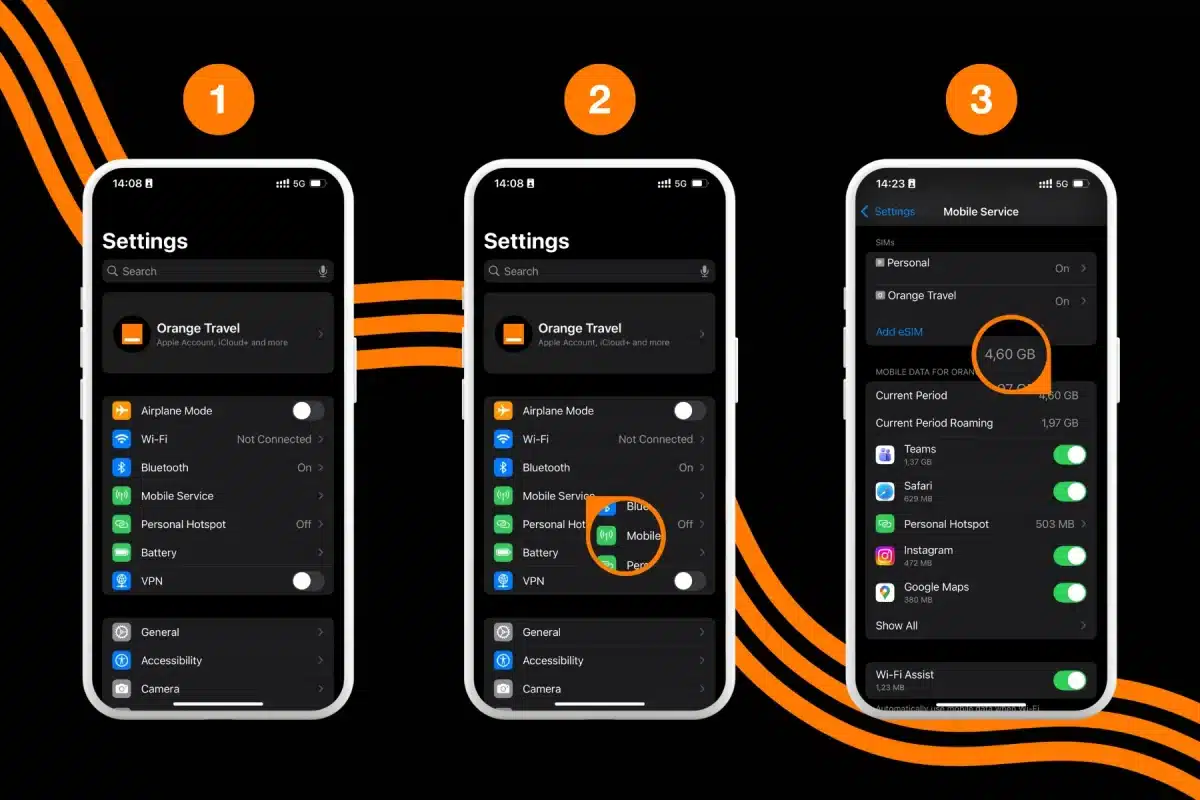
How to check hotspot data usage on iPhone and Android
To check your hotspot data usage on iPhone:
- Go to Settings
- Open Mobile Services (or Cellular)
- Scroll down to “Mobile Data For [eSIM label]” section (or “Cellular Data For [eSIM label]“)
- Look for Personal Hotspot to check its data usage
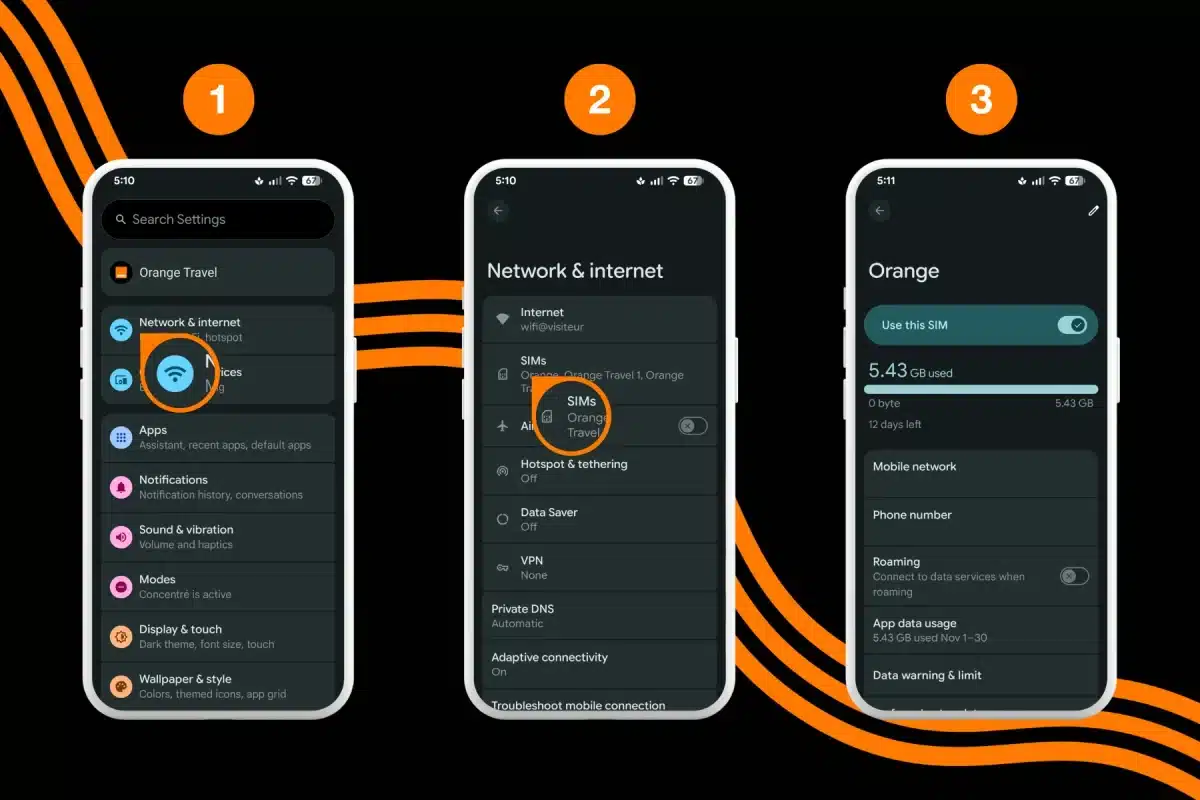
To check your hotspot data usage on Android:
- Go to Settings
- Open More Connectivity Options
- Select Data Usage
- Look for Mobile Hotspot to check its data usage
FAQs
How long will 1GB of data last on a hotspot?
1GB can provide approximately 12-16 hours of web browsing, over 15 hours of music streaming, or about 1 hour of Standard Definition video streaming.
How long will 2GB of data last on a hotspot?
With 2GB, you could stream about 2 hours of HD video, join a 3-hour video conference, or browse the web for more than 25 hours.
How much data does a hotspot use per hour?
It can range from as little as 60 MB per hour for light web browsing to over 3 GB per hour for streaming HD video.
Is 5GB enough for a short trip?
For a short trip of a few days, 5GB is often enough for essentials like maps, email, and social media. However, if you plan to stream videos or work on a laptop, you will likely need a larger data plan.
Conclusion
Using your phone as a hotspot is a convenient way to keep all your devices connected, especially when traveling. However, hotspot sharing can come with limitations. Always check your provider’s hotspot policies, speed caps, monitor your data usage regularly, and adjust your settings for maximum efficiency. With the right approach, you can stay connected and in control of your data plan.
Need unlimited hotspot for your trip to Europe? Get your Orange Travel Europe eSIM.