We have all heard horror stories about travelers returning home to a phone bill that costs more than their flight. Usually, the culprit is a small setting on your phone that was left unchecked : it’s data roaming. You should keep it OFF to avoid unexpected fees. However, you must turn it ON if you have purchased a specific international travel plan or an eSIM.
Understanding when to flip this switch can save you hundreds of dollars. Let’s break down exactly how it works and how to manage your settings like a pro.
What is data roaming?
Data roaming occurs when your phone disconnects from your primary mobile carrier’s network and connects to a partner network.
Think of it this way: Your mobile carrier (like Verizon, AT&T, or T-Mobile) builds towers in specific areas. When you are within range of those towers, you are “in-network.” When you travel outside that range your carrier pays a third-party network to keep you connected. This “borrowing” of a signal is what we call roaming.
There is a significant difference between domestic and international roaming:
- Domestic roaming: This happens when you travel within your own country but step outside your carrier’s coverage zone. Most modern unlimited plans include this for free, so you rarely notice it.
- International roaming: This happens when you cross borders. Because your carrier has to pay foreign operators to route your data, they pass those high costs on to you. This is where the expensive bills come from.
If you’ve ever wondered how your phone stays online abroad, our article about what data roaming is explains it in a clear and simple way.
Data roaming: On or Off?
It depends entirely on where you are and what mobile plan you currently have. The golden rule:
- Keep it OFF if you are relying on your standard domestic plan and traveling internationally without a pass.
- Turn it ON only if you have actively purchased a roaming pass, a travel bundle, or a travel eSIM.
If you leave it ON, your phone will automatically start downloading emails, updating apps, and refreshing social media feeds the moment your phone connects to a local network at the destination. These background processes use mobile internet which can lead to high roaming charges.
When should you turn data roaming off?
For most travelers, the default setting should be OFF. When you turn off data roaming, your phone stops using mobile data outside of your home network. You will not be able to load web pages, send WhatsApp messages without Wi-Fi, or use online maps. However, your phone will still function for standard calls and SMS texts (though these may still incur separate roaming fees).
The risk of “Bill Shock”
The main reason to keep this feature turned off is financial safety. International data rates can be astronomical. Some carriers charge upwards of $2.00 to $5.00 per megabyte (MB) for “pay-as-you-go” roaming. To put that in perspective, sending a single high-quality photo could cost you $10, and watching a 5-minute YouTube video could cost $50 or more.
Crucial scenarios for keeping data roaming off
- International travel: When you travel abroad, your phone will automatically connect to a local network as soon as you switch off Airplane Mode. If you did not purchase an international plan from your carrier and did not turn off data roaming, apps like email, WhatsApp or Instagram may use mobile internet in the background. This can lead to unexpected roaming charges.
- Border zones: If you are vacationing near a border (for example, San Diego near Mexico), your phone might accidentally pick up a tower from the neighboring country. If data roaming is on, you could be charged international roaming rates even if you never physically left the country.
- Cruises: Maritime roaming is notoriously expensive. If your phone connects to the ship’s satellite network, the costs are significantly higher than standard international rates.
General rule is to keep data roaming off to avoid surprise charges.
When might you need data roaming on?
While avoiding fees is important, there are times when data roaming should be turned on to use mobile internet abroad.
Scenarios where data roaming should be on:
- Using an international plan: If you purchased an international plan from your carrier, you must turn data roaming ON to keep using mobile internet while abroad.
- Using travel eSIM: You need to turn data roaming ON for your travel eSIM line to use mobile internet. However, make sure to keep data roaming OFF for your primary line to avoid accidental charges from your home carrier.
Since travel eSIMs and carriers’ international plans are usually prepaid, you don’t need to worry about “bill shock.” If you use up all your data, the connection simply stops (or slows down) without charging you extra.
Planning a trip? See our guide to the best eSIM for Europe.
How to turn data roaming On or Off
Note that steps may vary slightly depending on your device model or software version.
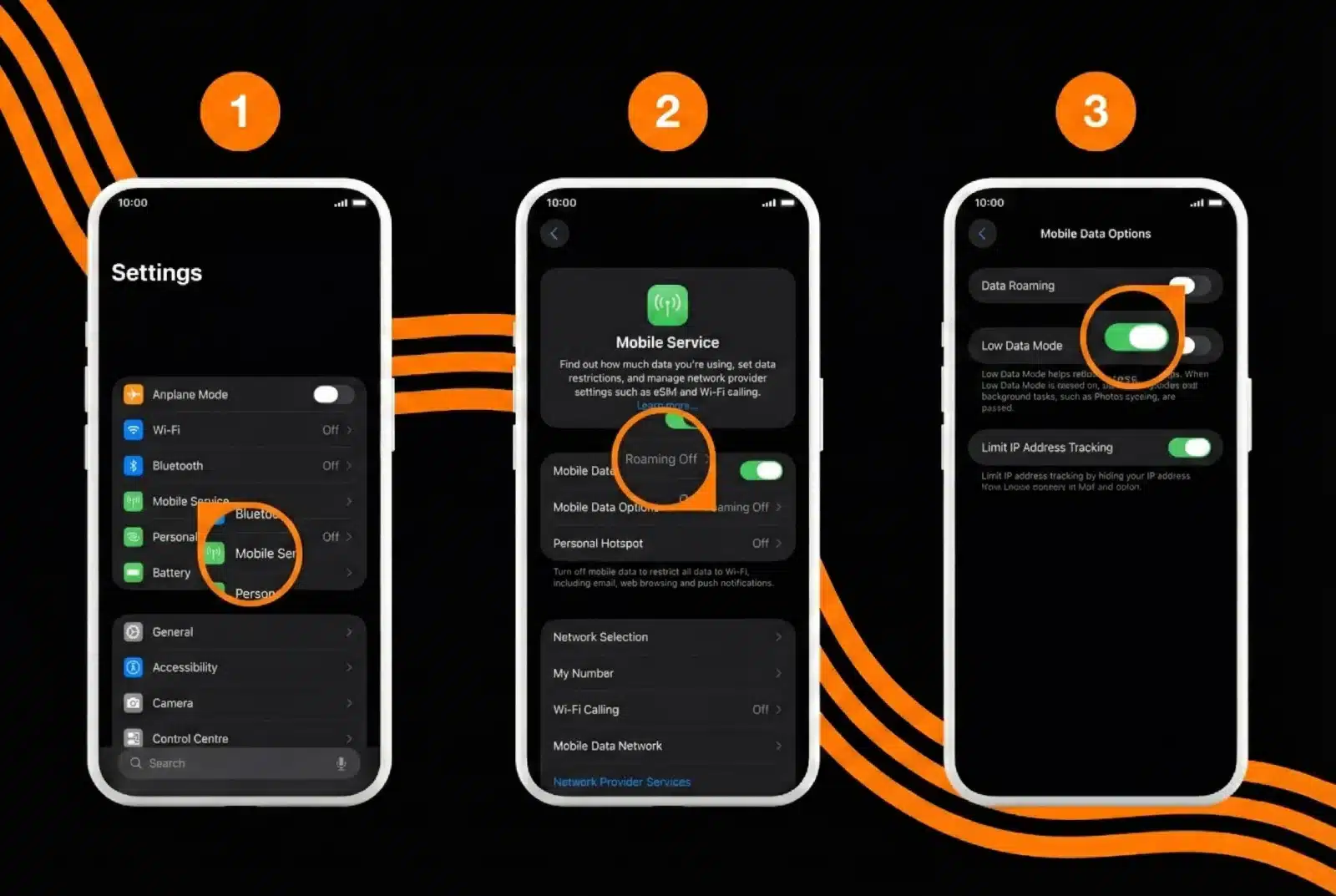
For iPhone Users (iOS):
- Open the Settings.
- Tap on Cellular (or Mobile Service).
- If you have a single SIM card or eSIM, go to Cellular Data Options (or Mobile Data options).
- If you have multiple SIM cards or eSIMs, select the line in SIMs section which you want to modify.
- Turn Data Roaming ON/OFF.
- Green: Data Roaming is ON.
- Grey: Data Roaming is OFF.
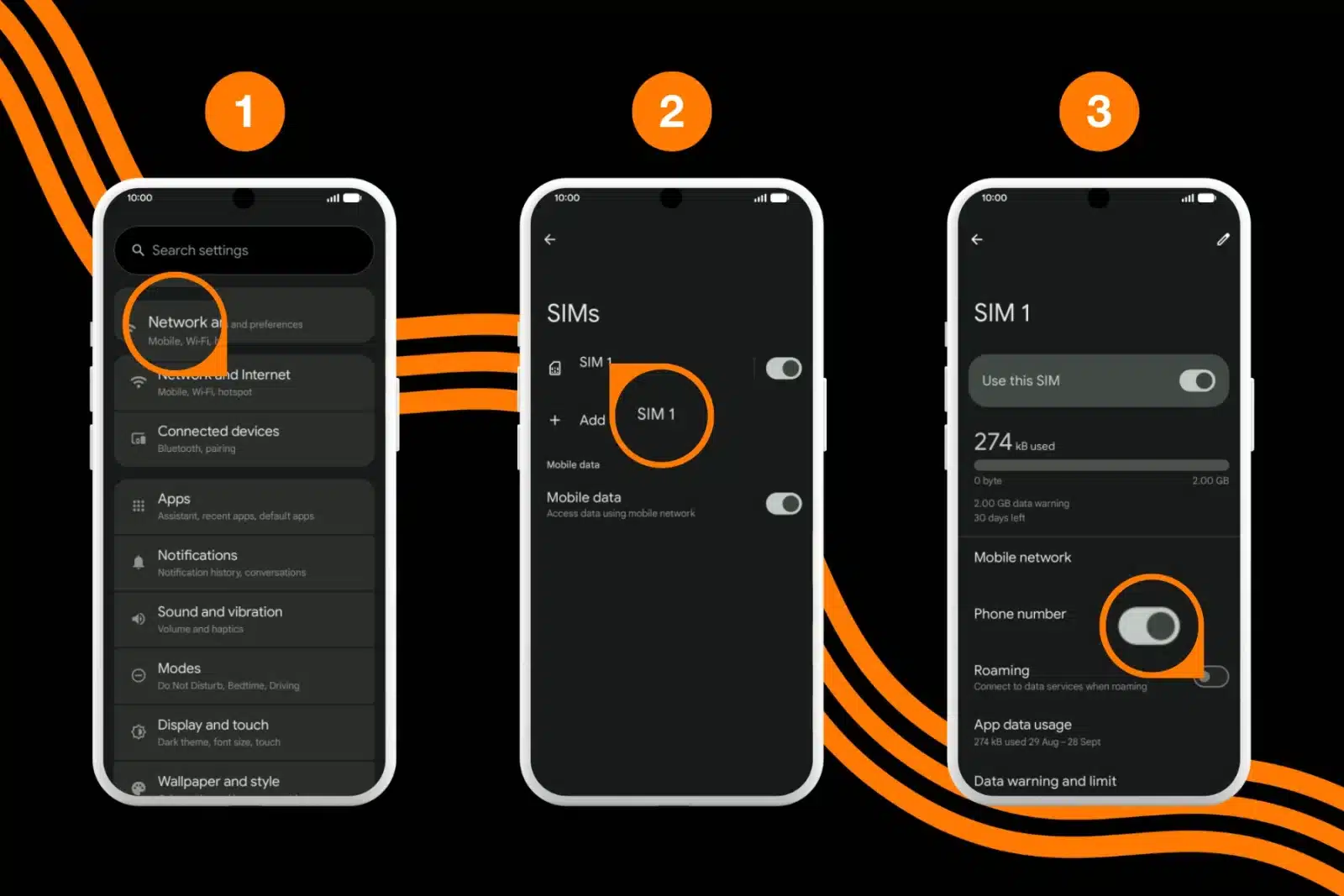
For Android Users:
- Open the Settings.
- Tap on Connections (or Network & Internet).
- Depending on the phone manufacturer, select Mobile Networks, OR tap SIMs > select the SIM you want to modify.
- Turn Data Roaming ON/OFF.
- Blue: Data Roaming is ON.
- Grey: Data Roaming is OFF.
Tip: If you have multiple SIM cards or eSIMs, ensure you are adjusting the setting for the correct SIM card. Learn how to configure your dual SIM setup for the best travel experience.
Need help setting up your travel eSIM? See how to activate your eSIM.
Get a travel eSIM to avoid data roaming charges
The smartest way to solve the “data roaming on or off” dilemma is to stop relying on your home carrier’s expensive roaming fees altogether. Instead, use a travel eSIM.
Orange Travel eSIM gives you generous data packages at local rates. Because you are buying a prepaid plan, you avoid the unpredictable “pay-per-MB” costs.
Visiting Europe? If you are planning a trip across multiple European countries, check out eSIM Europe. Get the best connection directly from the source with eSIM France if you are traveling to France.
Turn data roaming ON for the travel eSIM line while keeping it off for your primary home line. This setup allows you to stay connected abroad without incurring roaming charges.
Stay connected wherever you go
With Orange Travel eSIM, enjoy fast and reliable coverage in over 200 destinations. No SIM swap. No stress.
Get your eSIM
FAQ
Does data roaming use more battery?
Data roaming itself doesn’t directly drain your phone’s battery. However, when you are roaming, your phone frequently searches for the best available signal. If the network signal is weak, your phone’s antenna has to work harder to maintain the connection, which drains the battery faster than usual.
Can I still make calls/texts with roaming off?
Yes. Turning OFF data roaming only disables mobile internet. It does not block cellular voice calls or SMS text messages. However, your carrier may still charge you high per-minute rates for making or receiving calls internationally, even if data is off.
Conclusion
Deciding whether to keep data roaming ON or OFF comes down to preparation. If you have not prepared a travel plan, keep data roaming OFF. It is the only way to guarantee you won’t come home to a bill that ruins your post-vacation glow.
If you need internet access, plan ahead. Check with your carrier about their international passes, or better yet, purchase a travel eSIM to enjoy worry-free connectivity.