Traveling from Frankfurt Airport? Don’t risk being disconnected or paying expensive roaming fees. Pick up your international SIM card before you board.
WHERE TO FIND US ?
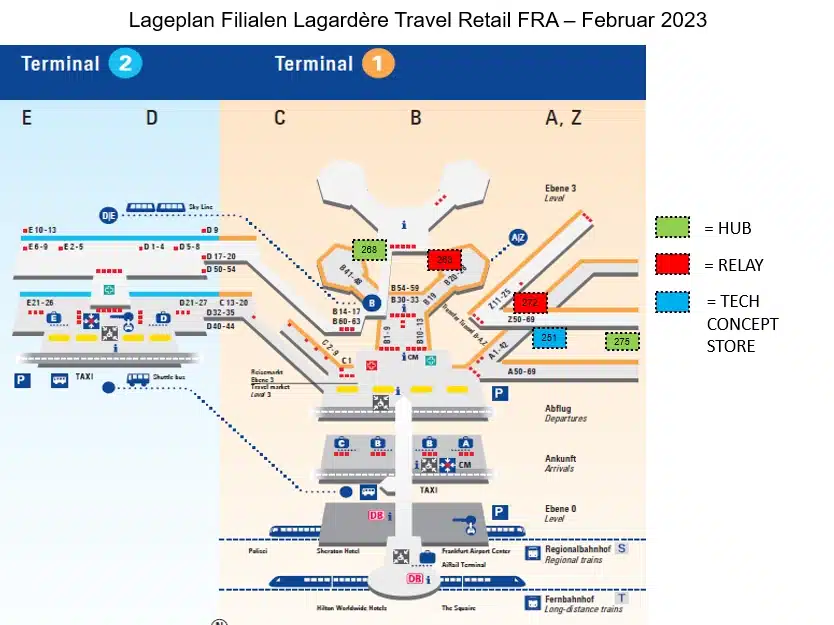
Our SIM cards are available across multiple locations throughout the terminal: look for the green, red, and blue squares on the map below to find your nearest store: Hub Convenience, Relay, and tech2go.
HOW IT WORKS
- Find your nearest store using the map below: look for the green (hub convenience), red (Relay) or blue (tech2go) squares
- Purchase your SIM World 20GB at €34.99
- Only when you arrive at your destination: Insert & activate.*
- Turn on Data roaming in your settings: On iPhone: Settings → Cellular → Cellular Data Options OR Click on your eSIM→ Enable Data Roaming On Android: Settings → Network & Internet → Mobile Network → Roaming → Enable
- You’re connected: Enjoy 20GB in 70+ countries for 30 days
*Note: the SIM card will not connect to any network outside of supported countries.
OUR OFFER: SIM World: The Essential Travel SIM
With Orange Travel, stay connected wherever you go
No contract, no roaming surprise, 70+ countries. Available right now across multiple locations inside the airport.
€34.99 / 20 GB · 30 days

FAQ
Which countries does this SIM work in?
The SIM World works in 76 countries:
Africa: Algeria, Botswana, Burkina Faso, Cameroon, Central African Republic, Egypt, Guinea, Guinea-Bissau, Côte d’Ivoire, Madagascar, Mali, Morocco, Senegal, South Africa, Tunisia.
Americas: Argentina, Brazil, Canada, Chile, Colombia, Dominican Republic, Ecuador, El Salvador, Guatemala, Honduras, Mexico, Nicaragua, Panama, Peru, Puerto Rico, United States, Uruguay.
Asia: Bangladesh, Cambodia, China, Hong Kong, India, Indonesia, Japan, Laos, Macao, Malaysia, Mongolia, Myanmar, Philippines, Singapore, South Korea, Sri Lanka, Taiwan, Thailand, Vietnam.
Europe: Albania, Belarus, Bosnia and Herzegovina, Faroe Islands, Guernsey, Isle of Man, Jersey, Kosovo, Montenegro, North Macedonia, Serbia.
Middle East: Israel, Jordan, Oman, Qatar, Saudi Arabia, Turkey, United Arab Emirates.
Oceania: Australia, New Zealand.
How do I keep track of how much data was used?
You will receive SMS notifications at 70%, 90%, and 100% of your data consumption to keep you informed.
What should I do if the internet isn’t working?
Try restarting your device, ensure your Orange Travel SIM card’s data roaming is toggled on in the settings.
On iPhone: Settings → Cellular → Cellular Data Options OR Click on your eSIM→ Enable Data Roaming
On Android: Settings → Network & Internet → Mobile Network → Roaming → Enable
If the issue persists, please contact our Customer Service.
I need customer support. Who do I contact?
Orange Travel customer support is available 24/7 in 6 languages. Please go to support.travel.orange.com and send your request via the available chat.